
Free AI summary of this YouTube video by SumTube
I'm Obsessed With This Open-Source Desk Accessory
TL;DR
This video reviews the TRMNL (Terminal), a 7.5-inch open-source e-paper display that functions as a customizable desk companion. Designed to show real-time information without screen distractions, it connects via Wi-Fi and is configured entirely through a web browser. The reviewer explores its hardware features, long battery life, and plugin ecosystem, demonstrating how it can be tailored for productivity, personal photos, and daily tracking.

Key takeaways
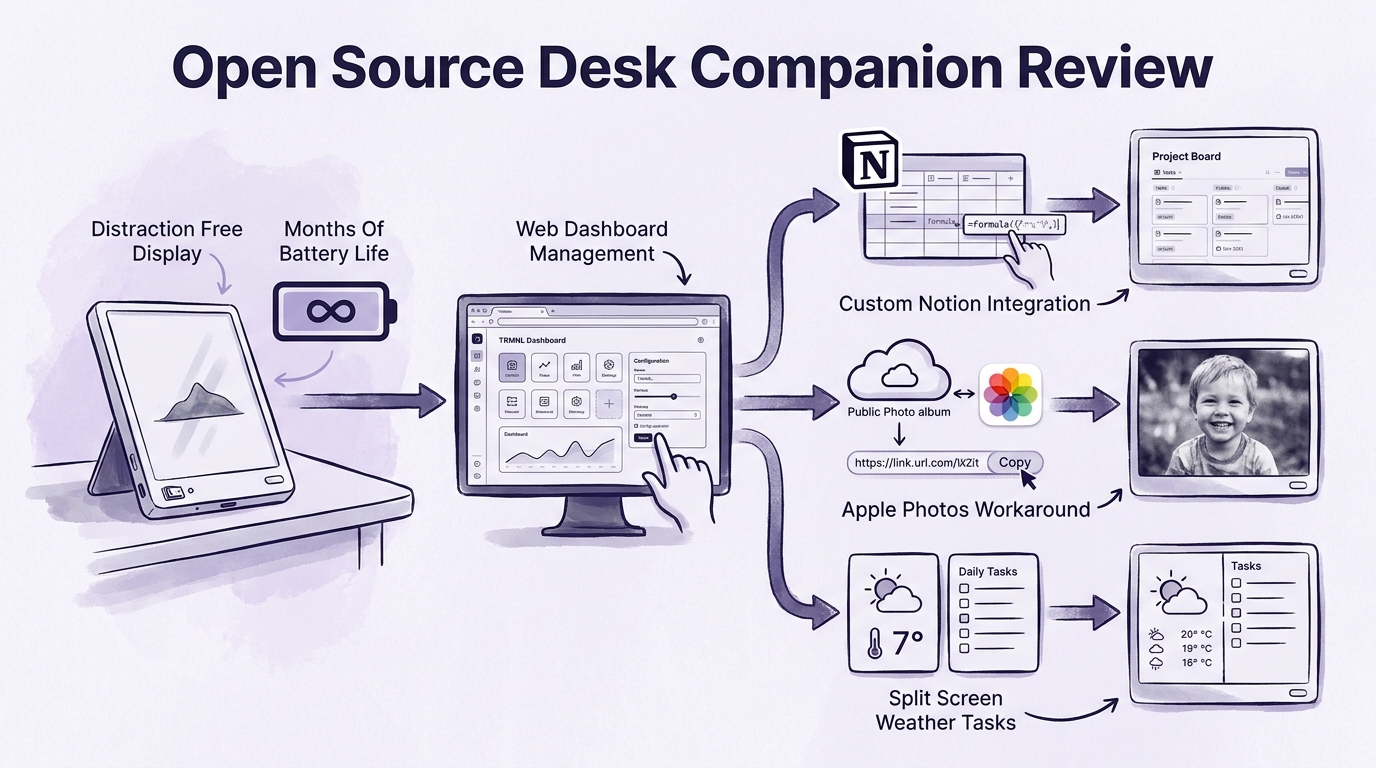
- 0:53TRMNL offers months of battery life and distraction-free viewing by utilizing a low-refresh static e-paper display
- 3:44Device management requires no dedicated apps; all plugins and layouts are configured via a web dashboard
- 5:28Complex integrations like Notion or Apple Photos require some setup tinkering, but provide extreme personalization
Tap to enlarge
Most valuable section
For whom
Desk setup enthusiasts and productivity tinkerers looking for a distraction-free, highly customizable passive display.
Notion Integration & Setup9:13
It demonstrates how to overcome basic platform limits using custom formulas and ChatGPT to build a tailor-made production tracking dashboard.
Detailed summary
1. Introduction & Overview of TRMNL
0:00The creator introduces TRMNL, a plain-looking 7.5-inch e-paper device that originally launched on Kickstarter. After testing several e-paper tablets and readers like the reMarkable and Boox Palma, she wanted to see if TRMNL offered a unique passive display solution.
TRMNL is positioned as an open-source e-paper companion meant to display live data, apps, and news directly on a desk without needing tethered cables or constant attention.
2. Hardware Specs & Display Performance
0:40The hardware is minimal, featuring an 800x480 resolution e-paper display, a rear kickstand, an power switch, a page toggle button, and a USB-C charging port. Its low-power e-ink display allows for ultra-long battery life lasting up to three months between charges.
While the screen refresh speed is intentionally slow—taking several seconds per full refresh—this is not an issue for a static ambient display. The viewing angles and contrast remain crisp in various room lighting conditions.
3. Web-Based Software Ecosystem
3:41Unlike most modern smart devices, TRMNL does not require a companion phone app or desktop software. All setup, plugin selection, and dashboard configurations are managed entirely through a standard web browser.
Users can choose from hundreds of community and official plugins or write custom code. The open-source nature gives users complete control over their hardware, similar to managing a Linux environment.
4. Notion Integration & Setup
9:13The host walks through setting up a Notion plugin to monitor YouTube video production schedules. Out of the box, basic sorting and filtering options in the plugin proved limited, displaying outdated entries.
To solve this, she created a custom formula property inside Notion dubbed the 'TRMNL Sort Key' with assistance from ChatGPT. This tweak allowed the screen to cleanly show active video projects, assignees, and current statuses at a glance.
5. Displaying Apple Photos
12:04To make the desk companion more personal, she integrated an Apple Photos shared album to randomly cycle through photos of her child. Because Apple limits direct third-party access, the workaround involves converting a shared iCloud album into a public web link.
By pasting the public URL into the TRMNL web dashboard, the screen successfully displays black-and-white, low-resolution photos that add a charming aesthetic to the workspace.
6. Google Tasks & Split Screen Layouts
13:58For daily task management, the creator connected Google Tasks. She initially ran into issues with task lists not updating frequently enough due to a default 24-hour sync interval, which she resolved by shortening the refresh rate to every 5 minutes.
She also highlights the layout customization feature, which permits splitting the screen into multi-column views. She pairs the live task list on one half with local, high-precision weather tracking on the other.
7. Exploring Plugins & Days Left Counter
16:42The plugin catalog features diverse options ranging from stock tickers and Strava fitness stats to train schedules and RSS feeds. The host settled on a 'Days Left' progress bar combined with a tear-away daily calendar design.
This visual combination serves as a gentle daily reminder of time passing throughout the year, featuring changing daily typography and date callouts.
8. Final Verdict
18:35TRMNL turns out to be far more useful and entertaining than its simple hardware suggests. It delivers a non-distracting, ambient way to surface important personal data, weather, and schedule updates right on a desk.
While setting up advanced custom views takes some initial effort, it is an ideal gadget for tinkerers and anyone wanting a low-key, dedicated screen free from notification noise.
Questions this video answers
What is the TRMNL device and how does it work?
TRMNL is an open-source, 7.5-inch e-paper display designed as a desk companion. It connects via Wi-Fi without needing a USB tether or a dedicated smartphone app. Users manage and customize the screen's content entirely through a web browser dashboard.
How long does the battery last on TRMNL?
Because it uses an e-paper screen that only consumes power when refreshing, battery life is measured in months rather than days or hours. Lowering the refresh frequency extends the device's battery life even further.
What kind of content can be displayed on TRMNL?
TRMNL supports over 400 plugins, including Google Tasks, Notion databases, Apple Photos, weather updates, calendar countdowns, and financial tracking. Users can split the screen to display up to four different plugins simultaneously or code custom solutions.
Ask a follow-up Premium
About this summary
SumTube AI wrote this recap from the video's words and chapters. Credit and the original belong to Switch and Click.