
Free AI summary of this YouTube video by SumTube
How to Run Google Maps Ads in 2026🔥 (Get Unlimited Local Leads Daily) | Free Google Ads Course
TL;DR
This guide demonstrates how local business owners can set up and run Google Search and Google Maps ad campaigns using AI tools and Google My Business. It walks through creating basic Smart Campaigns, conducting keyword research with AI, and transitioning to advanced campaigns via the main Google Ads Dashboard. Viewers will also learn how to link their profiles, set up location targeting, define daily budgets, and track performance.

Key takeaways
- Google My Business (GMB) profiles can serve as free landing pages for local ads if a business lacks a custom website
- Using AI tools like ChatGPT or Gemini helps generate targeted keyword lists and high-converting ad copy quickly
- Smart Campaigns offer an easy entry point for beginners, while the full Google Ads Dashboard provides advanced control and Performance Max options
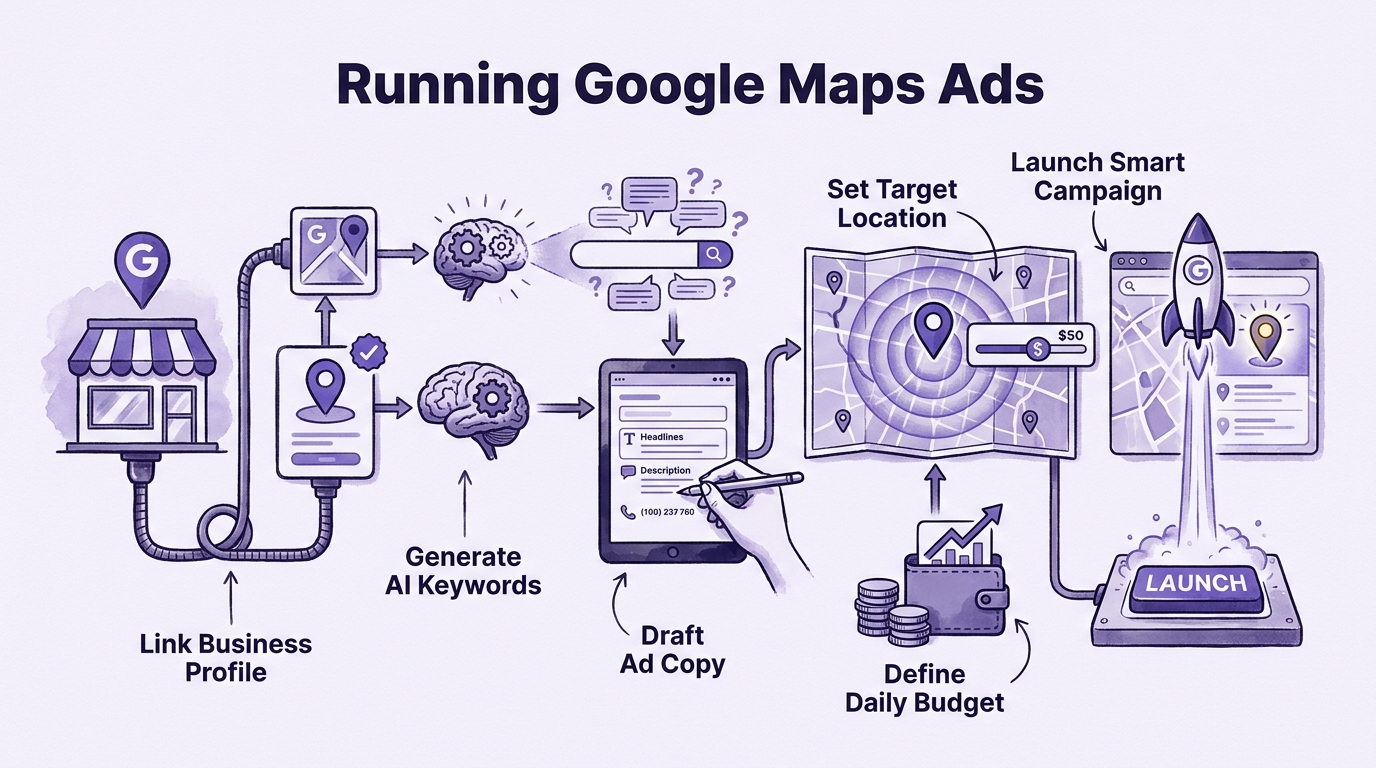
- Connecting GMB to Google Ads under a shared admin email allows businesses to trigger call-focused local ads directly on Google Maps
Tap to enlarge
Most valuable section
For whom
Local business owners wanting to run Google Maps and search ads independently without hiring an agency.
Connecting Google My Business to Google Ads Dashboard10:00
It explains the practical requirements and steps to link your GMB profile to the Google Ads Manager, enabling local map ads and Performance Max campaigns.
Detailed summary
1. Introduction to Google Search & Map Ads
0:00When users search for a business or service on Google, sponsored advertisements can appear at the top of both Google Search results and Google Maps. These paid promotions help businesses secure top-three rankings, allowing either their Google Maps listing or their website to stand out over organic results. Positioned prominently at the very top, these ads make it easier for potential customers to discover the business first, initiate direct contact through calls or inquiries, and convert into paying clients.
This tutorial focuses on how business owners can create and manage their own Google Search and Google Maps ads using AI tools, completely eliminating the need for prior digital marketing knowledge or expensive third-party agencies. By following a step-by-step approach starting from the basics, viewers will learn how to effectively run local and search ad campaigns to promote their businesses independently and expertly.
2. Prerequisite: Google My Business Profile & Landing Page Setup
2:04Before running Google Map ads or local ads, businesses must first set up a Google My Business (GMB) profile. Having a listing on GMB allows customers to find the business organically on Google Maps even without ads, and it significantly simplifies the ad creation process. For beginners running ads for the first time, Google offers a Smart Campaign option directly from the GMB profile. However, once an account is established and a first ad is launched, users are typically redirected to the main Google Ads dashboard for future campaigns rather than the basic Smart Campaign setup.
To create an effective local ad campaign on Google, advertisers need to manage seven key steps. The process begins with establishing a landing page, which can either be a custom website or the business's existing GMB profile. Next, businesses must define their campaign goal—such as generating phone calls, driving website visits, or encouraging physical location visits—followed by selecting the target location and conducting keyword research to match user search intent. Finally, the campaign requires writing engaging content, setting a budget, and tracking performance to ensure the resulting ad features proper headlines, descriptions, offer placements, and call buttons.
3. Creating Smart Campaigns for First-Time Users
7:26To create a Smart Campaign for the first time using Google My Business (GMB), log in with the email address linked to your business profile and navigate to the Business Profile Manager. Select your verified business profile and click the "Advertise" button to launch the setup process. You will be prompted to choose where users are directed after clicking your ad—either your GMB profile or an external website. For most local businesses without a website, selecting the GMB profile is ideal because it is free, easy to set up, and effectively captures local customer interest. Next, select your primary campaign objective from options such as driving physical visits, website leads, or phone calls, with selecting "Get More Calls" being the most recommended option for directly driving local inquiries and sales opportunities.
Once the campaign objective is chosen, you can customize your ad components by adding multiple headlines, detailed descriptions, and your contact phone number. Experimenting with several headlines and descriptions allows Google to vary the combination for optimal performance while ensuring the content complies with Google Ads policies. You can preview how your ad will appear on both mobile and desktop views, including search
4. Writing Ad Copy Using AI Prompts
15:25Using generative AI tools such as ChatGPT or Google Gemini can significantly streamline the process of writing effective ad copy, headlines, and descriptions for Google Search campaigns, especially for business owners without a strong copywriting background. The transcript distinguishes between search "keywords," which are terms typed into Google by users, and "prompts," which are the contextual instructions provided to an AI. To generate high-converting ad copy, users are advised to craft a structured prompt that assigns
5. Keyword Research with Google Keyword Planner and AI
31:43This chapter details the process of conducting keyword research for Google Ads smart campaigns using both Google Keyword Planner and AI tools like ChatGPT. It begins by explaining how keywords trigger targeted advertisements when users search for specific terms on Google. To identify effective keywords, advertisers can access Google Keyword Planner within the Google Ads dashboard to analyze average monthly search volumes, evaluate competition levels, and review top-of-page bid estimates, also known as Cost Per Click (CPC). Alternatively, advertisers can prompt an AI tool acting as a Google Ads specialist to automatically generate tailored keyword suggestions based on specific
6. Setting Targeting Location and Daily Budget
48:45The process begins by finalizing campaign settings, starting with confirming that the campaign is not related to European Union political ads. Next, geographic location targeting is configured, which can be done using two main approaches. Advertisers can set a radius around a specific address—such as an office or restaurant—to capture potential customers within a defined distance (e.g., 8 to 18 kilometers), or they can target specific geographic boundaries and postal codes, such as selecting particular cities like Noida and Greater Noida. This ensures that the ads are only displayed to users located within those defined areas who search for the specified keywords.
After establishing the location criteria, the next step is setting the daily budget. Google offers three automated daily budget recommendations, but advertisers also have the option to enter a custom amount. Setting a minimum budget of around ₹300 per day is recommended to achieve optimal results and generate quality calls. Once the budget is confirmed, a campaign preview appears displaying all details, including the business name, headlines, descriptions, phone numbers, keywords, and target locations. Upon reviewing and proceeding, payment details must be provided via credit card, debit card, or UPI to fund the account so the ad can enter the review process and begin running. Finally, once created, the campaign transitions to the main Google Ads dashboard, where advertisers can track clicks, impressions, and calls, as well as manage or pause their campaign.
7. Transitioning to Google Ads Dashboard
55:10Transitioning from a basic Smart Campaign to the full Google Ads Dashboard becomes necessary when you want to run additional campaigns, test new strategies (such as changing keywords), or gain deeper control over your advertising. While Smart Campaigns offer a simplified way to create local ads for Google Maps, the main Google Ads Dashboard acts as a complete Ads Manager. This platform centralizes all tools needed to manage, create, and track diverse ad types—including website ads, YouTube campaigns, display banners, and app download ads—all within one interface.
To set up ads via the Google Ads Dashboard, you must sign in to Google Ads using the same email address associated with your Google My Business (GMB) profile or your previous Smart Campaign. A crucial prerequisite for running local search and map ads through this dashboard is having a landing page destination for user clicks, which can either be a website or an optimized GMB profile. Ensure your GMB profile is properly connected to the Google Ads Manager account to successfully build and run targeted local business ads.
8. Connecting Google My Business to Google Ads Account
1:00:05To use a Google My Business (GMB) profile to run local business ads or treat it as a landing page, it must first be connected to your Google Ads account. For this connection to work directly, both your Google Ads account and GMB profile must share the exact same email address with admin access. If your GMB profile is currently under a different email, you need to open your GMB profile settings, navigate to "People and access," and invite the email address associated with your Google Ads account as a manager. Once that access request is accepted, you can proceed with linking the two platforms.
After ensuring the shared email access, return to your Google Ads dashboard and navigate to the "Tools" menu, then select "Data Manager." Under the "Connected products" tab, you will find options for various integrated tools, including Google My Business. Clicking on the GMB option will complete the linking process. Once linked, you can create a new ad campaign by clicking the "Create" button, selecting "Campaign," and choosing the "Local store visits and promotions" goal to effectively run location-targeted ads for your local business.
9. Creating a Performance Max Campaign
1:05:09The Performance Max (P-Max) campaign is recommended for running local advertisements across Google Maps, Search, YouTube, and other Google networks, particularly for businesses operating without a dedicated website. Unlike
10. Building Assets: Ad Copy, Images, and Videos
1:15:30To build high-quality assets for a Google Performance Max campaign, advertisers must prepare diverse ad elements because ads appear across multiple platforms, including Google Search, Maps, the Display Network, YouTube, Gmail, and Google Discover. The process begins by creating an asset group and selecting a landing page, such as a linked Google My Business
11. Building Assets: Ad Copy, Images, and Videos (2)
1:35:34This chapter focuses on finalizing ad assets, specifically highlighting the implementation of a Call to Action (CTA) button, such as changing it to "Contact Us" to make it simple and clear for users. While various asset types can be added—including promotions, prices, call-outs, messages, and forms—the primary objective here is to ensure the ad appears prominently on maps when users search for local services like "Best Dentist in Mumbai" or "Best Dentist in Delhi." Providing basic assets like headlines, a video, an image, and a simple CTA button or offer is sufficient for this initial stage.
The speaker advises against overcomplicating ads by adding too many extra assets right away, as doing so can lead to confusion. Instead, the focus should be on keeping the ads simple, testing them, and monitoring incoming calls. Advanced assets like promotions and prices should be integrated later when proper landing pages, websites, SEO, and tracking systems are fully set up to accurately measure user interactions. Finally, the transcript transitions into introducing "signals" as the next step in the ad creation process.
12. Adding Search Themes and Industry Budget Recommendations
1:38:32This chapter focuses on conducting keyword research and defining search themes for Google Ads campaigns using tools like Google Keyword Planner or AI prompts. Keyword
13. Final Campaign Review and Future Tracking Strategy
1:54:00To complete the setup of a Google Ads campaign, funds can be added through the billing section using payment options like credit cards or UPI, provided international payments are enabled on the card. While smart campaigns and Google My Business (GMB) map ads are sufficient for generating leads for local businesses, those with dedicated websites can transition to more advanced search campaigns. Advanced strategies involve utilizing custom landing pages rather than relying solely on GMB profiles, allowing businesses to drive traffic to specific web pages where users can interact, purchase services, or fill out forms.
Future advanced strategies focus on precise tracking and performance marketing to analyze customer behavior and maximize return on investment (ROI). By integrating tools such as Google Tag Manager and Google Analytics, advertisers can track every conversion metric, including form submissions, phone calls, button clicks, and page duration. This detailed tracking enables a complete sales funnel analysis, helping businesses measure customer retention rates, evaluate cost per click, and address drop-off points. Future instructional content will cover these advanced topics, including website creation, SEO, Google Ads integration, and AI automation to streamline business operations.
Questions this video answers
Do I need a website to run Google Maps ads?
No, a dedicated website is not required to run local Google Ads. Businesses can link their verified Google My Business profile and use it directly as the primary landing page destination.
How do AI tools help in setting up Google Ads?
Generative AI tools such as ChatGPT and Google Gemini assist non-marketers in writing compelling ad headlines and descriptions. They can also act as virtual ad specialists to generate tailored search keywords based on specific user intent.
What is the difference between a Smart Campaign and the main Google Ads Dashboard?
Smart Campaigns offer a simplified setup ideal for local business owners looking for quick lead generation directly from their GMB profile. The full Google Ads Dashboard provides granular control for managing complex campaign types, including Performance Max, display banners, and YouTube ads.
Ask a follow-up Premium
About this summary
SumTube AI wrote this recap from the video's words and chapters. Credit and the original belong to Indian Digital Academy.