
Free AI summary of this YouTube video by SumTube
How to Play GTA 5 on iPhone and iPad | Full Guide | Malayalam
TL;DR
This video provides a complete, step-by-step tutorial on how to install and play GTA V on iPhones and iPads without needing to jailbreak the device. It covers device requirements, necessary software tools like iLoader, file management procedures, and in-game performance and settings adjustments.

Key takeaways
- 0:28GTA V requires an iOS device with at least 6GB of RAM and 30-35GB of available free storage
- 3:13The installation method uses official Apple developer signing via your Apple ID, eliminating the need for jailbreaking
- 14:06If the app fails to open initially, Developer Mode must be enabled in iOS Privacy & Security settings
- 20:08In-game settings allow extensive customization, including resolution tweaks up to 1080p, custom HUD layouts, and mod support
Tap to enlarge
Most valuable section
For whom
Mobile gamers and iOS users wanting to run full PC games directly on their iPhone or iPad.
Step-by-Step Installation Process8:27
This section clearly demonstrates how to set up iLoader, connect your iPhone to a computer, install the IPA file, and unpack the 21GB game files.
Detailed summary
1. Introduction & Device Compatibility
0:00The presenter demonstrates GTA V running smoothly on an iPhone screen and explains that PC games can now be played natively on iOS devices. He outlines the hardware requirements needed to run the game without performance issues.
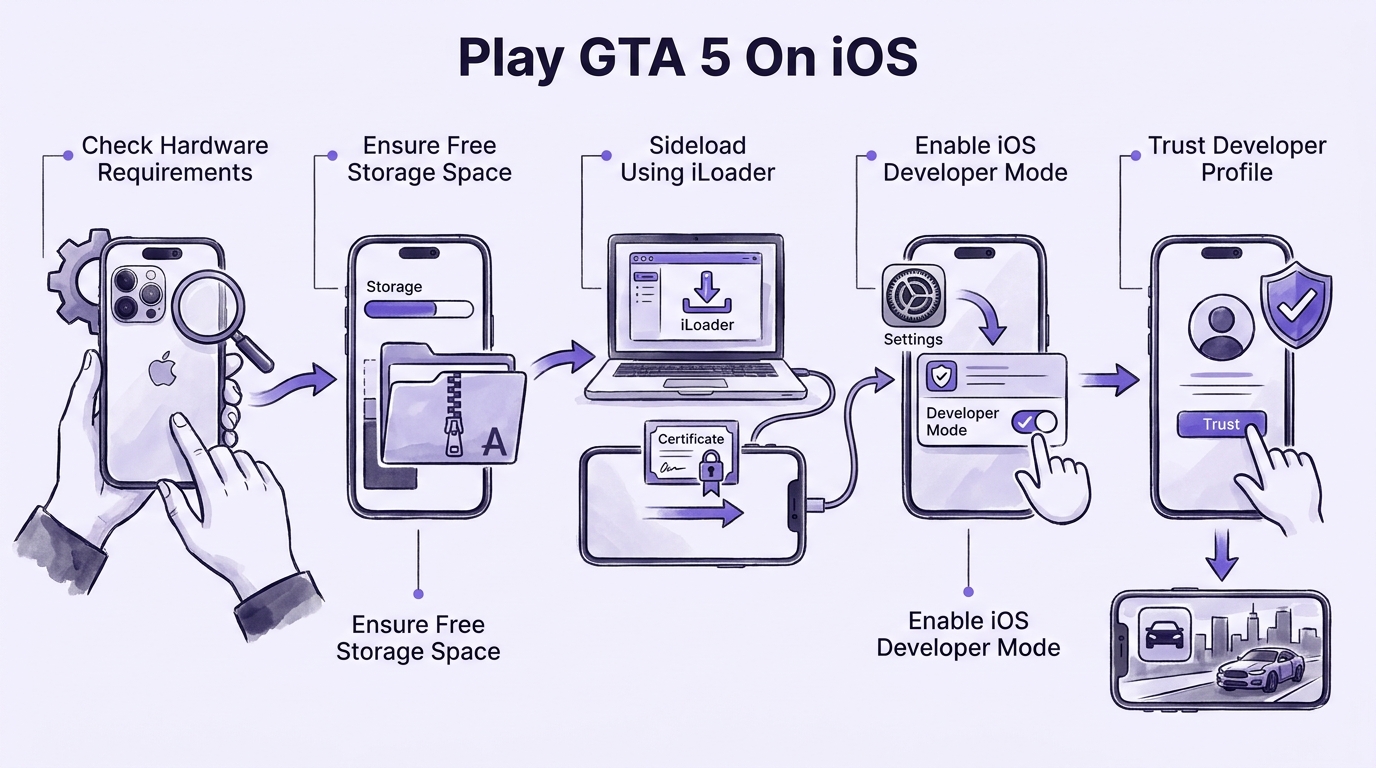
To run GTA V, your iPhone or iPad must have at least 6GB of RAM. Compatible devices include the iPhone 12 Pro, 13 Pro, and all newer Pro or flagship models. For iPads, compatible models include the iPad Mini 7th Gen, iPad 11th Gen, and any M1-powered iPad Air or iPad Pro.
2. Storage Requirements & Sideloading Basics
1:53The video highlights the critical storage requirement of 30GB to 35GB of free space on your iOS device. Since the core game file is roughly 21GB compressed, additional free space is mandatory to unpack and run the game smoothly.
Because GTA V is not hosted on the official App Store, it must be installed using sideloading technology. The process generates a provisional certificate linked to your Apple ID, making the installation safe, secure, and completely independent of jailbreaking.
3. Required Files & Software Overview
3:51To perform the installation, you need a computer running Windows, macOS, or Linux along with specific software and files. The main tool required is iLoader, an open-source IPA sideloading software.
Along with iLoader, you need the GTA V Port launcher IPA file (around 36MB to 88MB) and the main compressed game file (21GB). Windows users must also have iTunes or the Apple Devices app installed to ensure proper connection between the PC and the iOS device.
4. Setting Up iLoader & Downloading Game Files
5:19The presenter demonstrates how to download iLoader from its official website and acquire the required GTA V port IPA and game archive files. He notes that download links are provided in the video description, with backup drive links available if primary servers experience heavy traffic.
It is strongly recommended to download the 21GB game archive directly onto the target iPhone or iPad using the Files app or AirDrop over a wired connection to streamline the final file transfer process.
5. Step-by-Step Installation Process
8:27The step-by-step installation begins by launching iLoader on the computer and signing in with your active Apple ID and password. Once logged in, connect the iPhone or iPad to the computer via USB cable and select 'Trust' on both the computer and the device prompts.
After iLoader recognizes the connected iOS device, click 'Import IPA' and choose the GTA V Port launcher file. The software signs the application certificate and installs the GTA V launcher app onto your home screen.
6. Enabling Developer Mode & Trusting App Certificate
13:21If tapping the newly installed app displays an 'Unable to Verify' error, manual security permissions are required. Navigate to iOS Settings > Privacy & Security, scroll down to Developer Mode, turn it on, and restart the device.
Upon reboot, confirm enabling Developer Mode and enter your device passcode. Next, return to Settings > General > VPN & Device Management, select your Apple ID developer profile, tap 'Trust', and verify the application.
7. Unpacking Game Files Inside the App
15:27With the app verified, open the GTA V Port application and navigate to the 'Add Your Game Files' menu. Locate the 21GB downloaded archive file in the iOS Files app and move it directly into the newly created 'GTA V Port' folder.
Return to the game launcher, which will now detect the compressed archive. Select 'Unpack' to extract the nearly 6,000 game files. Once the progress bar reaches 100%, the installation is fully complete and ready to play.
8. Gameplay, In-Game Settings, and Customization
18:38Players can launch into either Story Mode or Sandbox Mode. In the in-game settings menu, options are available to customize touch controls, adjust screen HUD layouts, tweak graphics resolutions from 540p up to 1080p/Native, and toggle FPS counters.
During gameplay, tapping the in-game smartphone icon opens a cheat menu that allows instant vehicle spawning, mod installation, and environmental adjustments. The game runs smoothly with responsive touch controls, delivering a full PC-quality gaming experience on mobile devices.
Questions this video answers
Which iPhone and iPad models are compatible with GTA V?
Devices with at least 6GB of RAM are supported. This includes iPhone 12 Pro, 13 Pro, and newer models, as well as iPad Mini 7th Gen (2024), iPad 11th Gen, and any iPad Air or Pro equipped with an M1 chip or newer.
Do I need to jailbreak my iOS device to install GTA V?
No, jailbreaking is not required. The installation utilizes a sideloading software called iLoader to sign the .ipa file using your own Apple ID, making the process safe and secure.
How much storage space is required on my iPhone or iPad?
You need a minimum of 30GB to 35GB of free storage space. The main compressed game file alone is around 21GB, which needs additional room to unpack files smoothly onto your device.
What should I do if the app says 'Unable to Verify' after installation?
Go to iOS Settings > Privacy & Security, scroll down to Developer Mode, enable it, and restart your device. After restarting, approve the Developer Mode prompt and verify the app under Settings > General > VPN & Device Management.
Ask a follow-up Premium
About this summary
SumTube AI wrote this recap from the video's words and chapters. Credit and the original belong to Milan Thomas.