
Free AI summary of this YouTube video by SumTube
How to Install Mods on Switch 2 Emulator (PC)
TL;DR
This guide demonstrates how to install custom mods on Nintendo Switch emulators, such as Eden NX2 or PokeDinner, in about two minutes. By organizing downloaded mod files into specific folder structures mapped to a game's 16-digit Title ID, players can easily apply or disable custom skins and code patches. Following these steps ensures mods load correctly without corrupting the original game dump files.

Key takeaways
- 2:10Correct directory structure under the emulator's 'load' folder is essential for mods to apply properly without breaking the game
- 2:30Never copy mod files directly into your original game dump folder, as doing so permanently corrupts the base dump and forces a full re-dump
- 3:47Always verify that the mod's target version matches your game version to prevent boot crashes or non-functional mods
Tap to enlarge
Most valuable section
For whom
Gamers running Nintendo Switch emulators who want to safely customize their games with custom character skins or code patches.
Folder Setup and Common Mistakes2:10
This section explains the exact folder hierarchy required for mods to load and warns against common errors that can corrupt base game files.
Detailed summary
1. Prerequisites and Downloading Mods
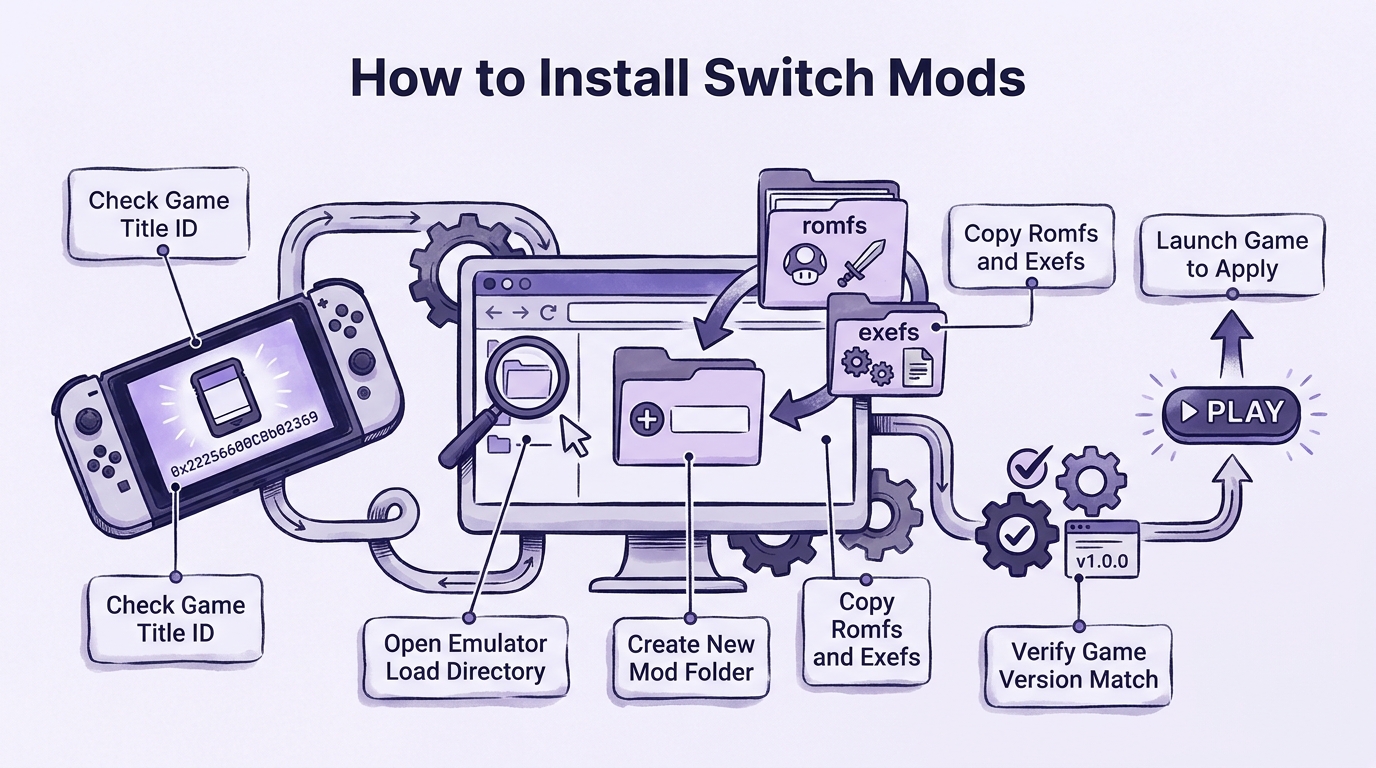
0:00To mod Switch games on PC, you need an emulator already configured to run your target game, a base game file dumped from your console, and your chosen mod files. Most Switch mods can be found on sites like GameBanana. Before downloading any file, check the mod's details to confirm it matches the exact game version you own.
Once downloaded, extract the archive to examine its structure. A standard mod typically contains a 'romfs' folder that holds replacement assets for the game. Some mods may also include an 'exefs' folder, which contains custom code patches.
2. Locating Title IDs and Emulator Mod Folders
1:41Every Switch game uses a unique 16-digit Title ID that emulators use to organize mod directories. While mod download pages often list this ID, you can also locate it manually by running your game once and checking the emulator's log file. Look for the line referencing 'Patching RomFS' to find the 16-digit code.
Next, use your emulator's file menu to navigate directly to the Mod directory (or Open Eglantine Folders). Inside the main mod directory, create a new folder named after your game's 16-digit Title ID. Within that Title ID folder, create another subfolder named after your mod.
3. Folder Setup and Common Mistakes
2:10Copy the mod's 'romfs' and optional 'exefs' folders directly into your newly created mod folder. The complete directory path should end with the load folder, the Title ID, your mod's custom name, and then the romfs directory. The most frequent installation error is accidental folder nesting, such as placing a romfs folder inside another romfs folder.
Crucially, never copy mod files directly into your original dumped game files. Modifying the original dump directly ruins the file structure and forces you to re-dump your game from scratch. Emulators rely on separate mod folders so they can lay modified files over the base game during boot safely.
4. Launching Mods and Troubleshooting
3:20Launch your game as usual through the emulator. As the game boots, the emulator automatically overlays the modded files onto the base game assets, applying your changes seamlessly. To disable a mod at any time, simply move its subfolder out of the designated load directory.
You can run multiple mods simultaneously as long as they do not edit the exact same game files. If a game fails to boot or mods fail to load, double-check that your game update version matches the requirements listed on the mod's source page.
Questions this video answers
How do I find a game's Title ID if it is not listed on the mod page?
You can launch the game once in the emulator and then navigate to the emulator's log folder. Open the log file and search for the line that mentions 'Patching RomFS', where the 16-digit Title ID will be displayed.
What should I do if the game won't start after adding a mod?
First, check the mod's download page to ensure it matches the specific game version you are running. Additionally, check for folder nesting errors, such as a extra romfs directory inside another romfs folder.
Can I run multiple mods at the same time?
Yes, you can keep as many mods as you want inside the game's Title ID load folder. They will all work together as long as two separate mods do not attempt to replace the exact same file.
Ask a follow-up Premium
About this summary
SumTube AI wrote this recap from the video's words and chapters. Credit and the original belong to Skrimby.