
Free AI summary of this YouTube video by SumTube
Can a Steam Machine Actually Run Switch 2 Games?
TL;DR
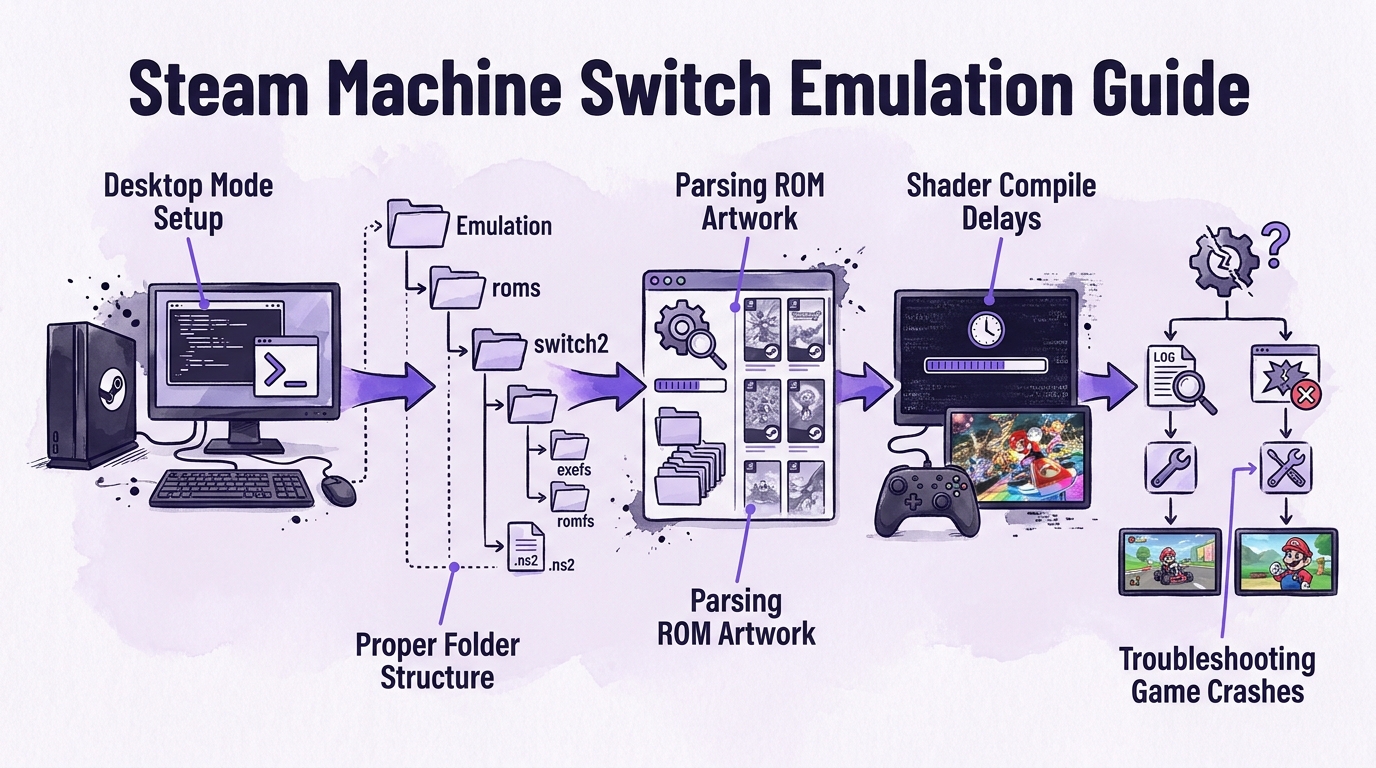
This guide demonstrates how to set up early-stage Nintendo Switch 2 emulation on a Steam Machine using EmuDeck and the Eglantine emulator. It walks through the desktop installation process, folder structuring, adding games to Steam, and troubleshooting common game crashes. Specific fixes are provided for titles like Mario Kart World and Pokopia, alongside tips for general file management and logging.

Key takeaways
- 0:29Steam Machines use the standard Eglantine emulator because dedicated VRAM differs from the shared memory architecture of handheld devices
- 1:46Switch 2 game dumps must be stored as extracted folders containing exefs and romfs, appended with '.ns2' to appear correctly in frontend launchers.
- 5:29Decrypted game dumps eliminate the need to search for external firmware or prod.keys files.
- 2:29Initial boot times can feature prolonged black screens and shader compile stutter before rendering playable gameplay
Tap to enlarge
Most valuable section
For whom
Steam Machine owners wanting to set up and troubleshoot early Switch 2 emulation.
Fix 1: A black screen in Mario Kart3:30
It explains the cause of AMD graphics driver crashes in Mario Kart World and provides the specific workaround script settings needed to get the game running successfully.
Detailed summary
1. Prerequisites and Architecture Differences
0:00Setting up Switch 2 emulation on a Steam Machine requires EmuDeck, a mouse and keyboard in desktop mode, and legally dumped Switch 2 games. The setup process takes roughly ten minutes and relies on community-reported configurations during this early stage of emulation development.
Hardware architecture dictates which version of the Eglantine emulator is required. While handheld devices share system memory with graphics, the Steam Machine features 8 GB of dedicated VRAM, allowing users to run the standard Eglantine build along with helper utilities like PokeDinner.
2. Installing and Configuring EmuDeck
0:40To begin installation, switch the Steam Machine to Desktop Mode, open the terminal console, and execute the installation script. The script automatically detects the dedicated graphics hardware, downloads the proper Eglantine build, and adds dedicated Switch 2 directories to both EmulationStation and Steam ROM Manager.
Next, game files must be organized properly within the file system. Navigating to the Emulation/roms/switch2 directory, each game should be placed in its own folder containing exefs and romfs subdirectories. Appending '.ns2' to the folder name ensures that frontend managers recognize the directory as a single game title.
3. Importing Games into Steam and First Boot
2:05Once game files are structured, open Steam ROM Manager within EmuDeck to parse the new files and pull artwork. Saving these targets to Steam adds the Switch 2 games directly into the handheld library and EmulationStation interface under a new system category.
Launching a game for the first time may result in an initial delay or extended black screen while shaders compile. Early gameplay testing on actual hardware shows functional performance in titles like Mario Kart World, though minor graphical bugs like missing shadows and foliage remain.
4. Troubleshooting Crashes and Log Files
3:30Common crash fixes involve targeted workarounds for specific titles. For Mario Kart World, driver crash fixes trade minor visual effects like ribbon trails for stability. For Pokopia, using or removing the PokeDinner launcher addon can bypass initial boot hangs depending on individual system results.
If games fail to load or EmulationStation closes unexpectedly, users should verify target paths in Steam properties and ensure exefs/romfs folders are situated at the top of the update directory. The lastrun.log file in the Eglantine directory provides diagnostic details for unhandled errors. Re-running the installation script updates the emulator software without overwriting existing save data or games.
Questions this video answers
Do I need to download system keys or firmware to emulate Switch 2 games?
No, you do not need external keys or firmware files. Because the process relies on legally dumped game folders that are already decrypted, searching for additional key files on third-party sites is unnecessary.
How do I fix the black screen crash in Mario Kart World on a Steam Machine?
The black screen issue occurs when the AMD graphics driver crashes during loading. The custom setup script automatically enables a specific workaround for folders named with 'MarioKart', which prevents the crash at the cost of minor visual effects like missing trail ribbons.
Why need game folders end with '.ns2'?
Adding '.ns2' to the end of a game's main folder name allows EmulationStation to detect the extracted directory (containing exefs and romfs) as a single selectable game title rather than loose files.
Ask a follow-up Premium
About this summary
SumTube AI wrote this recap from the video's words and chapters. Credit and the original belong to Skrimby.